
The best photography apps you need to try
Are you wondering which of the millions of apps in the app store you really need? Don’t stress! Today, we’re looking at the best photography apps that you should have.
Best camera apps
When looking for the best raw camera app for iphone, you might be asking if the inbuilt camera is enough or do you need something will a little bit more control. It all depends on the type of photography you want to achieve.
Native built in camera
There’s no deigning that the camera’s continue to get better, but will the built in camera do the job? Yes, for those who want to capture things quickly or want to carry minimal gear with them. But you need to make sure you have the one of the latest with pro mode allowing you to make minor camera settings like shutter speed or overall exposure.
For those who want to take it to the next level but forgot their DSLR you might want to try on of the other camera apps.
Different shooting modes include:
- Easy access
- Beyond the frame (you can see more than what is being captured)
- QuickTake (burst mode in video)
- Adjust your focus and exposure
- Portrait mode for blurred backgrounds
- Night Mode, Live, HDR, scene detection
- Lens correction
- HEIC Format

Adobe’s Lightroom CC – Best raw camera app for iphone
Regarded as the best professional photo editing software and free photo editor app for mobile. Yes, it’s free (with limited features) but for most it works great. It’s ability to sync with adobe’s creative cloud makes it ideal for those who already have the adobe’s photography plan.
Different features include:
- Easy Access
- Capture raw photos
- Adjust full manual controls (exposure, ISO, shutter speed, focus and white balance)
- Compose shots using viewfinder overlays
- Shoot through presets
- Crop ratios
- Trigger delay
- Highlighter warning
- Powerful Editor that syncs via Adobe Creative Cloud
- Presets
- Tutorial Library


Moment – Pro camera app
Don’t worry if you haven’t invested in moment lenses, you can still use this app. Check out this Pro camera tutorial to all it’s features:

Different modes include:
- Full manual controls (exposure, ISO, shutter speed, focus and white balance)
- Live histogram
- Raw burst
- Timelapse
- Slow shutter for long exposure
- Siri Voice Control (perfect for selfies)

Camera+ 2
Camera+2 has some great features, and is great for when you want precise control of a specific element of your photo, however for everyday it just wasn’t as good as the others.
Different shooting modes include:
- Manual controls,
- Blur your background in portrait mode
- Excellent low light in night mode
- Live photos
- Burst mode with video
- HDR

Editing Apps
How to choose the best photo editing app
You really need to think about what level of editing you want to achieve on your smartphone. While I will edit on my phone with out and about I personally also like to transfer my photos and edit on my desktop. So think hard about what editing features you’ll use the most.
Best creative camera app: Photoleap (aka Enlight Photofox)
Photoleap is for more creative individuals wanting to add text overlays, local brushed effects.
- Lightricks Tutorials
- 3D transformations
- A wealth of filters
- Canvas Crop Tools
- Enchance clarity
- Heal tool
- Sketch effect
- Mask tool
- Collage tool

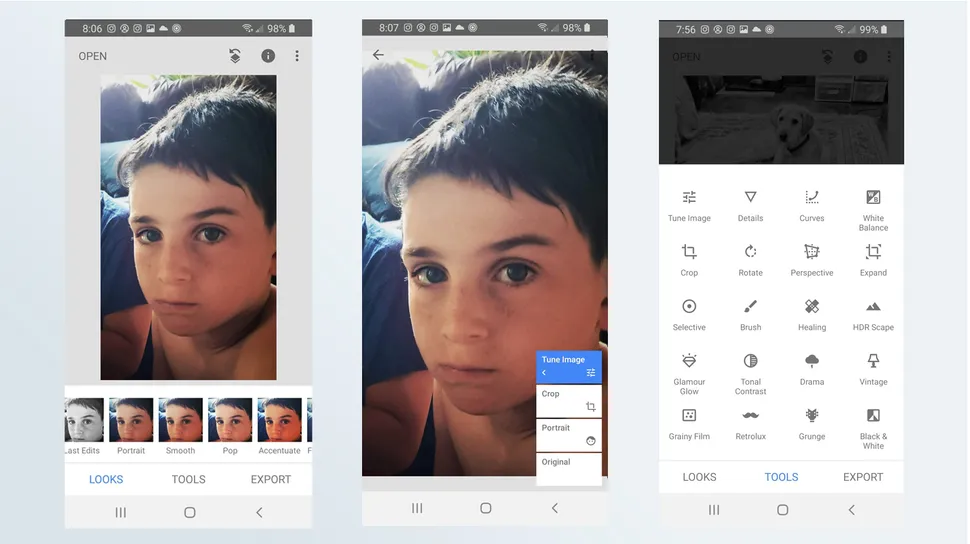
Best editing app for detail oriented editors: Snapseed
Snapseed is one of the older editing apps out there, and while it uses the same slider as many of other editors, it’s features are hidden in several layers of menu with titles that you’ll need to decode yourself. However that being said, it has a great range of editing tools.
- RAW Develop – open and tweak native camera files; save non-destructively or export as JPG
- Tune image – adjust exposure and color automatically or manually with fine, precise control
- Details – magically brings out surface structures in images
- Crop and rotate
- Perspective – fix skewed lines and perfect the geometry of horizons or buildings
- White Balance – adjust the colors so that the image looks more natural
- Selective Brush – selectively retouch exposure, saturation, brightness or warmth
- Healing – remove the uninvited neighbour from a group picture
- Text – add both stylized or plain text (38 predefined styles)
- Curves – have precise control over the brightness levels in your photos
- Lens Blur – add a beautiful Bokeh to images (background softening), ideal for photographic portraits
- Glamour Glow – add a fine glow to images, great for fashion or portraits
- Tonal Contrast – boost details selectively in the shadows, midtones and highlights
- HDR Scape – bring a stunning look to your images by creating the effect of multiple exposures
- Drama – add a hint of doomsday to your images
- Grunge – an edgy look with strong styles and texture overlays
- Grainy Film – get modern film looks with realistic grain
- Vintage – the style of color film photo from the 50’s, 60’s or 70’s
- Retrolux – go retro with light leaks, scratches, film styles
- Noir – Black and White film looks with realistic grain and the “wash” effect
- Black & White – classic Black and White look straight out of the darkroom
- Frames – add frames with adjustable size
- Double Exposure – blend two photos, choosing from blend modes that are inspired by shooting on film and by digital image processing
- Face Enhance – add focus to the eyes, add face-specific lighting, or smoothen skin
- Face Pose – correct the pose of portraits based on three dimensional models

Best community filter app – VSCO
Great for those who want to know the latest filter trends and looking to a community.
- Limited free adjustment and correction tools
- 10 free filters
- Built in camera
- Explore other peoples edits
- Community photo challenges
- No selective edits

Best free photo editing app – Adobe Lightroom CC Mobile
While there is a free version of Lightroom, there’s also a Lightroom Mobile
- Non destructive editing of fine details, light, colour, geometry tools
- Lighttrom Presets
- Pro Level Camera
- Smart Photo Organisation
- Advanced photo sharing
- Easy Creative Cloud Storage
Best photo sharing app
There’s no point in creating beautiful photos if you’re not going to share them with your friends, family and like minded people.
Instagram is the most popular social media for sharing images and a great place to find your community.
You can also protect your privacy, avoid harassment and ditch the hashtags by using a private account.

Flickr
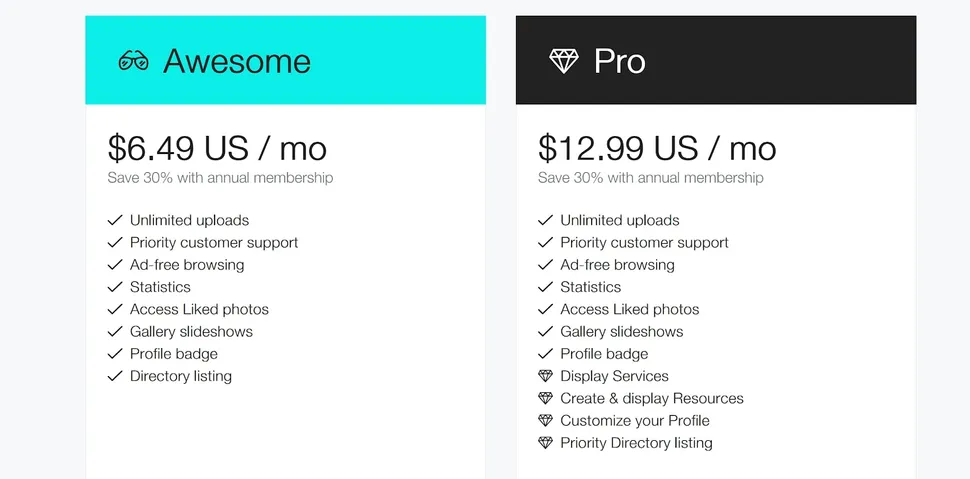
Flickr offers you x 1000 of photo storage for free and allows you to organise and tag your photos in collections. However if you want an ad free unlimited storage with stats and a load of bonuses you’ll want to try Flickr Pro (Monthly $6.99, plus tax)

500px
Join over 8 million photographers, with a free two week trial that allows you to sell your photos online (however, it doesn’t allow you to set your own pricing 🤨). It’s also a great source of inspiration.
Google Photos
Sync your photos automatically. Google Photos currently allows unlimited storage of compressed quality photos; however, this will end on June 21, 2021. From then, all newly uploaded photos will count towards a Google account user’s free 15 GB. (Photos uploaded before June 21, 2021 will be grandfathered in.)
Amazon Prime Photos
Sync your photos automatically. Amazon offers 5GB to all member & unlimited to Prime members. If you need more storage without a Prime membership, you can purchase 100 GB for $19.99 annually (or $1.99 monthly) or 1 TB for $59.99 annually (or $6.99 monthly).

Verdict – What are the best photography apps?
For capturing and editing I personally love Adobe Lightroom Mobile and it’s a great way to trialing Lightroom before subscribing and for those who want something a little simpler then I’d use VSCO. When it comes to sharing and storing your photos, if you already have an Amazon Prime membership then it’s an obvious choice alongside Instagram. However, if you don’t then I’d try Google One’s Photos.


