
Adobe Lightroom Review: Focusing on What’s Good and Bad
Lightroom is a powerful image editor that has quickly become one of the most popular photo editing programs on the market. It’s easy to use, and it integrates well with Adobe Creative Cloud which is great for those who are subscribed. However, there are some downsides to Lightroom as well. To help you decide whether or not this program is right for you, I’ve put together an in-depth Adobe Lightroom review!
What is Adobe Lightroom?
Adobe Lightroom is a high-powered editing tool for busy photographers. It offers a wide range of editing tools and easy-to-learn editing tutorials. Adobe has added watermarking, local hue adjustments, versions, and custom raw file import settings to Lightroom. The new Lightroom CC still lacks local printing, tethering, and plug-in support. Despite Adobe’s improvements to Lightroom CC many veteran users will likely still want to stick with Lightroom Classic for their workflow.
Adobe Lightroom Versions – which Adobe Lightroom is best?
At the moment there’s three versions of Adobe’s Lightroom: Adobe Lightroom Classic, Adobe Lightroom CC and Adobe Lightroom Mobile and of course that’s all before looking at camera RAW and Photoshop. So how do you pick which one you need?
The most common question I get asked about editors is:
Adobe Lightroom CC vs. Lightroom Classic vs. Photoshop
What is the difference between Lightroom CC and Lightroom Classic?
The two versions of Adobe Lightroom are so similar that it can be hard to know which one is the best. They both have a range of useful develop controls, like tonal sliders and selective adjustments for developing your photos. All in all they seem pretty equal but there are some fundamental differences between the two programs worth considering before you make up your mind on what version will suit you best: Check out my post Lightroom CC vs Classic to help you pick.
Adobe Lightroom Review of Pricing
You can choose either Lightroom CC on it’s own or as part of Adobe’s Photography plan. They both start from 9.99/ month. There are currently 3 plans for you to choose from.
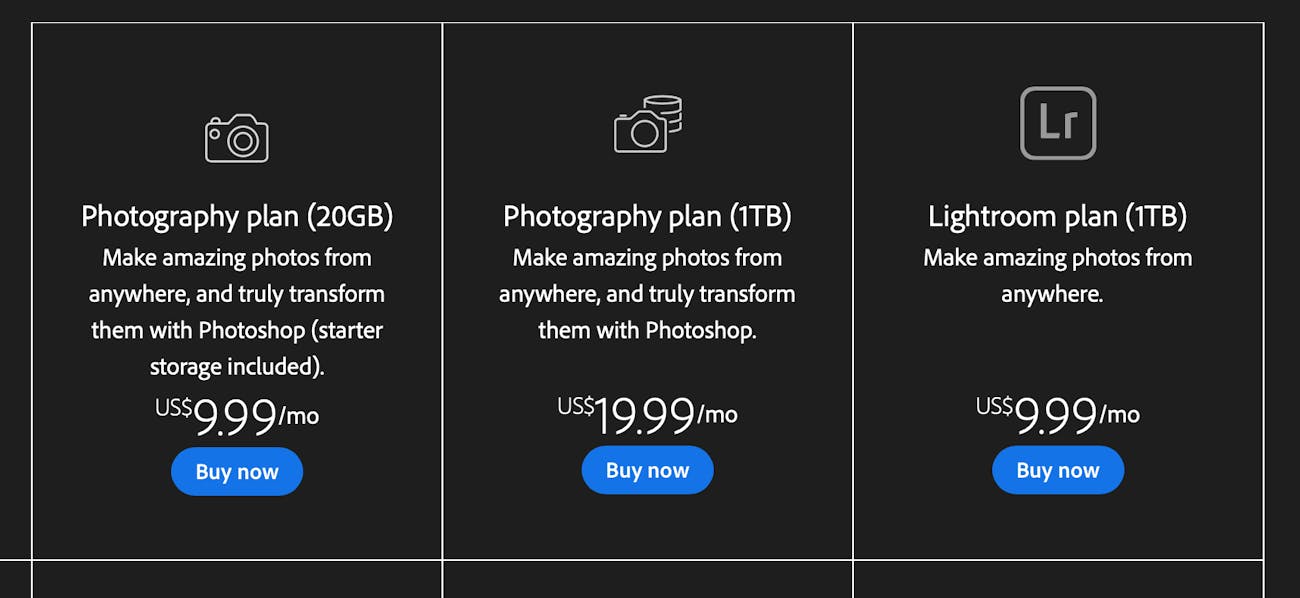
Adobe Lightroom: Minimum system requirements
The minimum requirements are:
– Windows: 64-bit, Intel Core i64 processor or better
– Mac OS X: Multicore Intel processor with AVX support; MacOS Mojave (version 11.0)
-8 GB of Ram
But you can find out more here.
Adobe Lightroom: Interface
Adobe Lightroom CC’s interface is intuitive and easy to navigate. It has three sections: Home, Learn, Discover.
- Home is a hub of inspiration, recommended tutorials and a library of your photos.
- Learn is an array of tutorials to help you master Lightroom editing
- Discover allows you to see work people have shared. It’s full of inspiration.
The interface is designed with Adobe’s linear workflow in mind where you import your photos first and then work on them in the develop section before finally exporting or sharing online.


Adobe Lightroom: Device support and file management
Lightroom CC’s cloud based file management is a huge improvement from the previous version. Users can access photos across multiple devices and share their works in Adobe’s cloud storage service. However, one downside of Lightroom CC is that it doesn’t support local file management like its predecessors.
Lightroom CC files are organised into catalogues and collections. Catalogues are the default storage of images which you can access from both desktop and mobile. Collections on the other hand are a more user-friendly way of grouping photos for easy navigation that doesn’t require an internet connection to view or edit them. Alternatively, you can alway use keywords and filters to sort your photos.

Adobe Lightroom Mobile app
Lightroom CC has a mobile app that allows users to edit their images on the go and send them back to the cloud. A great backup of your photos. However, there’s a catch: you can only access and edit images that are stored in your Lightroom catalogue or collection. If you want to use all of the features available on Adobe Lightroom mobile then it is necessary for you to buy an Adobe Creative Cloud subscription which includes storage space via their online service called Adobe Creative Cloud. It also means it requires internet connection to edit on, so make sure you have a decent data plan or use wifi.
Adobe Lightroom Guided tutorials

Adobe Lightroom CC has a set of guided editing tools that are great for beginners who want to learn how to edit their photos without being overwhelmed by the program’s many options. These include quick edits, which are single slider presets you can apply in bulk to a bunch of photos. You can also create your own custom presets and apply them to future edits with the click of a button.
Is Lightroom CC worth it?
I really think it depends on which editors you’ve already dabbled with and how confident you are using Adobe software. Lightroom CC is for complete beginners or people who only need the most basic of editing features. However, if you’ve already tried Lightroom Classic and found it overwhelming then I think this version is definitely worth a try. If you’re looking for something more advanced like Photoshop then go with Adobe’s subscription plan that offers both programs at once; otherwise stick to Lightroom classic.
Adobe Lightroom Review: What I Like
– integrations into Adobe’s Creative Cloud programs such as Photoshop, Illustrator, InDesign etc
– easy to use interface that is both beginner friendly and functional for more advanced users
– unlimited storage space in Adobe’s Creative Cloud platform
Adobe Lightroom Review: What I Don’t Like
– interface lacks customisation
– lack of plug in support
– confusing pricing system that charges per device and subscription fee for lightroom classic, light room CC or photoshop cc. This is a great article.
– lack of tethering support
– no local file management (no way to view and edit Lightroom photos offline)
Lightroom is a great program, but you have to decide for yourself if it’s the right one for your needs, as their are other alternatives if it doesn’t. I recommend trying out Adobe Lightroom CC on its own first to see how well you like using it before making the bigger investment of purchasing the entire Photography plan or just sticking with Adobe Lightroom Classic, if you want to do more complex editing without using Photoshop!


