
Effortless Understanding of Aperture

Understanding aperture or the exposure triangle and being able to confidently and easily take control of your camera to create the exact exposure you’re seeking for, means understanding each aspect of the triangle (aperture, shutter speed and ISO). By the end of this post you will understand what aperture is; how and when to use it, and feel confident in the process.
What is aperture in photography?
Aperture is how big the opening is into your lens and this affects the amount of light allowed to enter and the depth of field. As you can see from below the bigger the opening the smaller the number. (I know it’s annoying, but thats just the way it is)

How is aperture measured and changed?
Aperture is measure in f stops. I know what your thinking: What is a f-stop?
The f-stop, which is also known as the f-number, is the ratio of the lens focal length to the diameter of the entrance pupil. If you did not understand that, don’t worry, because there is a much easier explanation of it for beginners. In very simple language, f-stop is the number that your camera shows you when you change the size of the lens aperture.
And why do the numbers the numbers go up as the opening gets smaller.
I thought the exact same thing when I first started, unfortunately, Its a mathematical thing, and maths was never my favourite subject. What you need to know is that from each number to the next, the aperture decreases to half it’s size, allowing 50% less light through.
Most DSLR go up in increments of one third of a light stop. as shown below. Moving from f2.8 to f4 is a whole stop of light, but you could move a 1/3 of a stop from f2.8 to f3.2.
The range of f-stops:
1.0, 1.1, 1.2, 1.4, 1.6, 1.8, 2.0, 202, 2.5, 2.8, 3.2, 3.5, 4.0, 4.5, 5.0, 5.6, 6.3, 7.1, 8.0, 9.0, 10.0, 11.0, 13.0, 14.0, 16.0, 18.0, 20.0, and 22.0.
The easiest way to show you how this effects your exposure is to show you. If you just change the aperture nothing else. This is what happens.

Can you see how the bigger the opening the more light comes in.
How to adjust aperture?
To adjust your aperture setting on Canon hold down AV button and spin the wheel.

Minimum and Maximum Aperture of Lenses
The minimum and maximum aperture settings are usually found on lenses’ specifications pages. The lower number indicates the widest opening available; the higher number represents the smallest possible hole through which light passes. For example, an 18mm lens has a maximum aperture of 2.8, whereas a 50mm lens has a maximum of 1.8.
When choosing between different focal lengths, remember that wider angles have larger maximum apertures than longer ones.
Zoom lenses minimum aperture will change as you zoom in. So if your zoom lens says 18-55mm, but has a range of f/3.5 to 5.6 then it will be brighter when zoomed out and darker when zoomed in.
By understanding the relationship between focal length and aperture, you can make sense of lens specifications quickly and easily. For example, if you know that your lens covers an angle of view of 90 degrees, you can calculate that it has a focal length of 36mm. At full aperture, this lens will let through twice as much light as a standard 50mm lens – so if you need to achieve the same exposure with both lenses at the same ISO speed and shutter speed then you’ll have to use a shutter speed that’s half as fast with the wider lens.
There are many different types of photographic lenses available, all with a specific focal length and maximum aperture.
How to find the aperture of a lens?
To find the aperture of a lens you’ll need to know the two numbers that appear on many photographers lenses:
Lens Aperture setting scale (where you can change the aperture) 1-22, 1/3 or f/1.8 – f/22
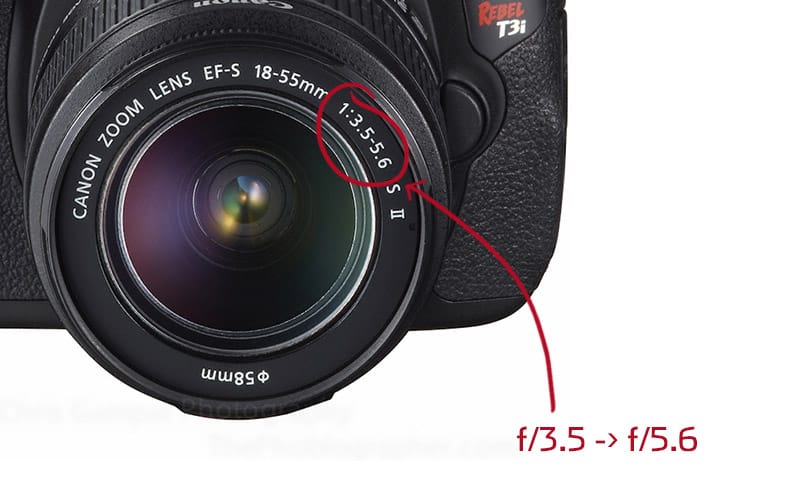
Maximum aperture number ( f stop ) of your lens and its focal length .
Example : 18-55mm lens , if your zoom lens says 18-55mm, but has a range of f/3.5 to 5.6 then it will be brighter when zoomed out and darker when zoomed in for example 18mm f/3.5 – 55 mm f/5.6
Finally, answering the question: Why does aperture change when I zoom my lens even in manual mode?
Wide aperture lenses tend to be more expensive than zooms with more limiting aperture range, but it’s something to think about when picking the best lens.
How does aperture affect shutter speed?
Aperture refers to the size of the lens opening which is measured in f-stops, from a small hole wide enough for one ray of light to pass through, like f/1.4, to a larger aperture (hole) letting lots of light in, such as ƒ/5 found on a camera with interchangeable lenses.
The aperture you choose will affect shutter speed, because if you choose a wider aperture like 2.8 then you’ll be letting in more light. Which means you’ll need a faster shutter speed to avoid blur and achieve the correct exposure.
How does aperture affect bokeh?
When we change the aperture size, this changes how much light is coming into the camera and also how big the circle of light from a particular point looks on screen.
By understanding these two components, we could create the ‘bokeh’ effect (or blurred bokeh).
How Aperture effects depth of field?
Now to the fun bit, because Aperture isn’t about just exposure its about depth of field. (This is how blurry your background it)
Depth of Field is how much is in focus. A shallower/ Narrower depth of field (DOF) means less will be in focus. Life the top row. in order to achieve this you need a wider/ aperture, like f2.8. However, you want more of the background in focus, you will need to increase your depth of field and therefore need a narrower aperture like f/22. This is great when considering which compositional rules you want to use and how to maximise their effects.


Can you see the difference?
So which f stop do you need?
There are no set rules on this one, but what I will say is that here are a few starting points.
f/1.4: A wide aperture is great for shooting in low light, but be careful of the shallow depth of field, because it can be too shallow, making it difficult to keep the image in focus.
f/2.8- f/4: Still good for low light situations, but allows for more definition in facial features as it has a deeper depth of field. Great for close up single person portraits.
f/5.6: Good for photos of 2 people, not very good in low light conditions though. So either use a reflector or bounce some flash.
f/8: My street mode, I use f/8-f/11 when out and about.
f/11: This is often where your lens will be at its sharpest so it’s great for portraits, if you’ve got a clean or story telling background.
f/16: Shooting in the sun requires a small aperture, making this is a good ‘go to’ point for these conditions.
f/22: A narrow aperture is best for landscapes where noticeable detail in the foreground is required, but watch out for diffraction if you don’t have enough available light.
What is aperture priority?
Aperture priority is a camera mode in which you manually set your aperture , while the camera automatically selects a shutter speed That’s all there is to it.
When should you use aperture priority?
Aperture priority allows you to take control of JUST the aperture and the camera will adjust the other settings allowing you to get used to just this setting and its potential. It’s a great starting point for beginners wanting to learn manual mode.
It’s great for adjusting the depth of field, whether you want a blurred background for a portrait or want a full focused landscape.
When To Avoid Aperture Priority Mode
Aperture priority mode is great for many types of photography, but there are scenarios when you want to avoid using it. For low light situations that would require a slower shutter speed in order to capture the full range of detail and provide natural looking photos, manual mode will be best as aperture priority may not work correctly. HDR also requires bracketed shots which cannot be taken with aperture priority alone; focus stacking can only occur manually so avoiding any other modes while shooting portraits outdoors or studio-style photographs indoors should suffice
How to Use Aperture Priority Mode in 3 simple steps


